Saturday, January 16, 2016

QR codes and Comic Strips

Hi! Semester almost over! Yay!

Ok, so I enjoyed watching Avraham's videos and the qr codes with questions. Though these were exciting and interesting, I agree  with the man from the video, and am not entirely sure what the benefit of QR codes are over links sent in a mail. I understand that QR codes make things more organized, so I hope to try this out one day.

I looked over the cooltoolsforschool page that Avraham suggested, and was excited  by the thousands of tools for the classroom that can be found there. I found myself  drawn to the 'comic creating' section.  I tried out a few comic creating websites- Toondoo, Comigs, Pixton. They were limited yet fun and I like the  idea that I can create my own comics and that I can make this a fun assignment for my students. 

Picture_106.pngPicture_82.pngPicture_84.png

Monday, December 28, 2015

Week 10- Research for the Classroom


Hey everyone! So I tried out a bunch of different resource websites, but Ill say it straight out- nothing beats Google and Wikipedia. 
I find that many of the suggestions were things that Google can find too. 
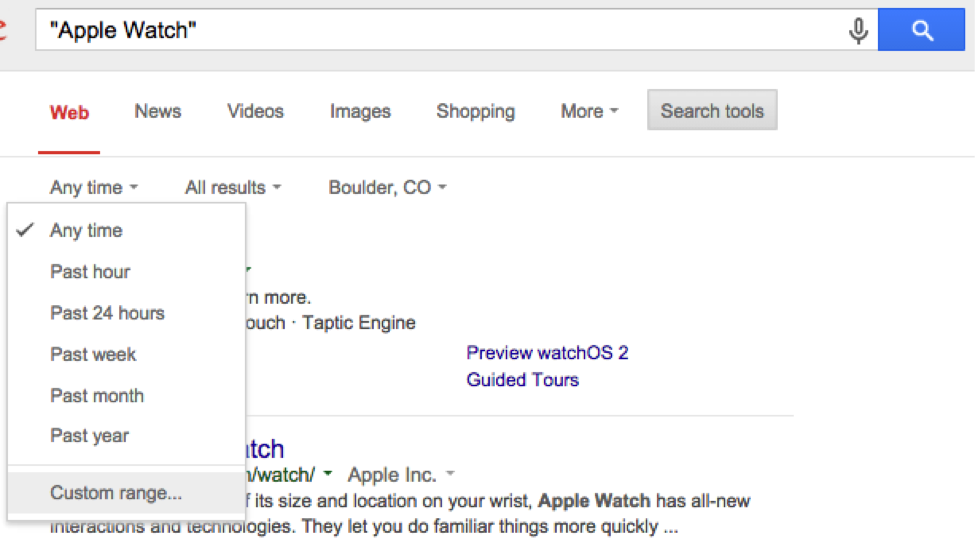
I particularly liked using the tool in google that brings you results from the last 24 hours/week.
This can be very useful for narrowing your research to current affairs and events only.


Wikipedia Simple English is great. Just last week I wanted to bring a text to a class I was teaching from Wikipedia, and found myself deleting and changing half the words in it, as they were too hard. This is the perfect solution for that situation. 

Monday, November 16, 2015

Week 6- Lots to Write About


  Wow! So many new ideas! If I wrote about all the ones I likes we will be here for a while.

1) Printing Press

Through this website, students can create newspapers, brochures, flyers and signs with many realistic looking templates and designs. I think that this is a great creative writing activity that can be incorporated in a lesson, either alone or in pair work. Example:A certain  event can be introduced, and students must create a front page of a newspaper discussing the event.

2) Spelling Bee and Spelling City

These two great websites, are great for practicing spelling. It is possibly harder to use them in a classroom setting, but would be great tools to use at home for students to practice.


3) Make Your Own Story

Here students are given story templates and have to fill in words that they would like to go in their stories. It's cute, but can only really be used as a one time thing as there is not much option here. 

4) Story Jumper

This is a fun website that allows students,to create their own story book through adding text, pictures and more. I think this can be a task to work on over a few lessons. Students in pairs, can first brainstorm what they want their picture book to be about, and prepare outlines of the story, and then actually get to work creating it. Students should first have good knowledge about how to access pictures.

5) Class Tools

As I demonstrated above, you can go anywhere with this one. They have fake facebook pages, SMS conversations and others. This can be used very nicely in an audio-lingual class, where the focus is on teaching spoken language through conversations between two people over SMS. 

Monday, November 2, 2015

Week 4


You didn't see they had a whole section about me in the paper this week?!!
Now I think this websites pretty cool! Go to http://photofunia.com/ and have some fun creating!
I think this tool can be incorporated creatively into a lesson, using familiar faces of people on the school or city, famous figures etc...

You've got to know the technology you are dealing with. The Innovative Educator gives us some tips on how to properly use various free educational programs in the classroom. You cannot just bring and put the kids to work. A teacher bust be fully aware of the program's instructional design and learning objectives. How exactly will the program be incorporated?  What will the teacher's involvement in the student learning look like? These are among many things that must not be overlooked when bringing computer programs into the classroom.

Thanksgiving is around the corner. Though not so commonly celebrated in Israel (though you will find some holiday turkeys here and there, in the US its a big one. Free Technology for Teachers, brings some useful websites with ideas for making the holiday part of the English lessons. I didn't take to much interest in the ideas given there, but it definitely reminded me of the obvious - current holidays are perfect topics for use in English classes!

Monday, October 26, 2015

Technology Battle and Managing the Stress

"During this lightning-paced smackdown, presenters will make their cases for apps, add-ons, and other edtech tools while the audience votes on their favorites. Who will be left standing at the end of this battle? "

The Innovative Educator reports on this awesome event. Check out some of the apps that interested her:  http://theinnovativeeducator.blogspot.co.il/2015/10/4-edtech-tools-ive-never-used-before.html#more


Did you know stress effects your body? Makes sense... In this Ted Ed lesson, I learnt all about how stress is connected directly to our brain and our whole body.


Enjoy!

Monday, October 19, 2015

The First Few Tips I Have Learnt


I have started following three blogs as required in this course. I have already learnt some really great tips!!
In the blog "Digitally Yours", the writer shares with us three great apps for keeping yourself organized and getting your shopping done.


 She recommends Google Keep and Out of Milk- 2 great shopping applications where you can share your shopping list with others and add pictures.
The app that interested me most was Any Do- this app organizes your life, reminds you to call people and much more. (Actually created in Israel!) 
  
 Click here for more info- Any Do   

A useful tip from blog "Free Technology for Teachers ": Don't point the webcam at your nose! When sending videos or live stream to students, line up the webcam with your eyes for the most effective angle.

Is it possible that social media can be used positively during gatherings? The Innovative Educator says Yes! The ideas I liked the most were,
1) Using group chat to find each other at a big event
2) Sharing questions and photos of things you see at a museum./event in a social media group and a  discussion can be formed
3) Those who couldn't make it- can enjoy for afar

Monday, October 12, 2015

Expectations...

I thought that I knew pretty much all there is to know about computers and technology. The first lesson has barely started, and I have already learnt many new things.
I never even really knew what a blog is! So I am very excited to learn all the new and different ways that technology and online resources can be used effectively in today's classroom. I can't wait to use and apply what I learn in this class to my teaching.